
Choosing the right Usb Car Fan in 2026 requires more than comparing prices and star ratings. Global buyers face different climates, vehicle interiors, USB standards, and driving conditions. A compact fan that feels powerful in a mild European summer may struggle inside a parked car in Southeast Asia. This guide examines ten leading models through practical, buyer-focused criteria.
We consider airflow strength, noise, power consumption, mounting stability, cable length, speed control, and cleaning access. Each factor matters during real use. A loose dashboard fan can vibrate over rough roads. A short cable may limit placement near the rear seats. Some models also advertise strong cooling without explaining whether they circulate air or reduce temperature. That difference deserves attention.
Our approach combines product specifications, hands-on observations, user feedback, and basic safety considerations. We look for fans suitable for cars, vans, taxis, and long-distance travel. USB compatibility is reviewed carefully, including common 5V ports, adapters, and power-bank use. Performance may change between vehicles. It may even disappoint in extreme heat.
No ranking can fit every buyer perfectly. Some drivers value quiet operation, while others need maximum airflow for passengers. Others prefer a flexible clip, metal grille, or dual-head design. The selections below aim to make those trade-offs clearer, not hide them. Small details matter. A better purchase often begins with realistic expectations.
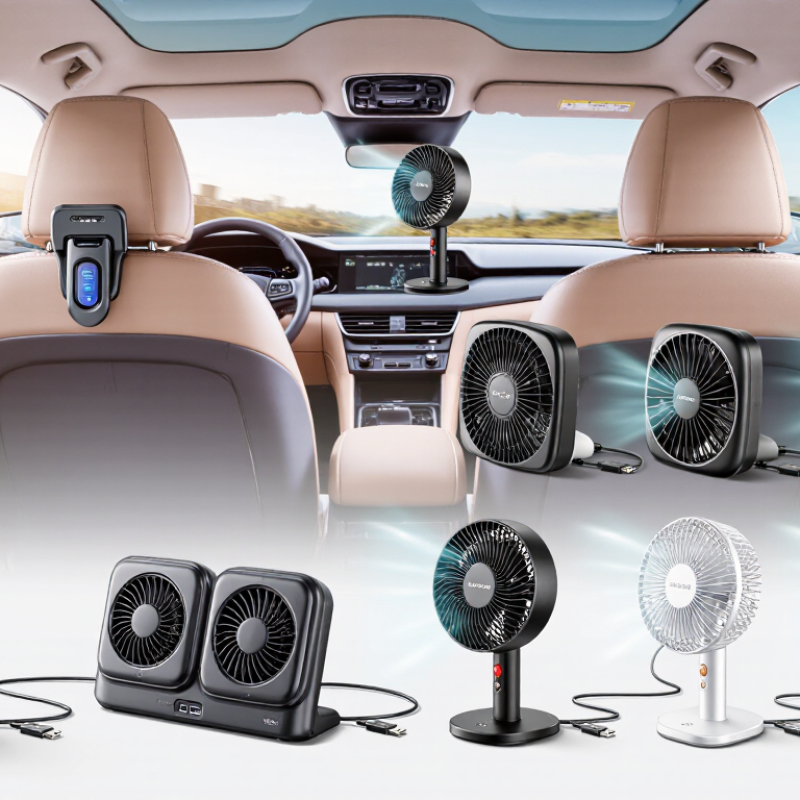
A USB car fan draws low-voltage power through a vehicle’s USB port or a compatible adapter. Most models use a small motor to spin plastic blades, pushing cabin air toward passengers. The fan does not produce cold air like an air conditioner. It moves existing air across the skin, helping sweat evaporate and reducing the feeling of heat.
Airflow helps quickly.
This difference matters in humid regions, where a parked car can feel heavy and uncomfortable. Global drivers may use USB fans during traffic delays, long-distance travel, or when resting inside a vehicle.
They can also improve air circulation for rear passengers, especially in larger cabins. However, performance depends on blade size, motor strength, placement, and the vehicle’s USB output.
A practical check involves measuring airflow from the driver’s seat, then listening for vibration at different speeds. A fan that shakes on the dashboard may become distracting after an hour. Mounting it near airbags, mirrors, or controls creates another concern. The USB port should provide suitable power, and drivers should check whether it remains active after the ignition is off. Otherwise, the vehicle battery could drain.
Some fans promise powerful cooling but deliver only a narrow breeze. That weakness is easy to miss in a short product test. Buyers should compare noise, oscillation, cable length, grille strength, and cleaning access. Dust gathers quickly around small blades. A reliable fan is not always the strongest one; stable airflow and safe placement often matter more.
A useful USB car fan should provide steady airflow without shaking on uneven roads. Compare airflow strength, fan speed settings, noise, and power stability. A quiet motor matters during long drives, especially in small cabins. Check whether the fan uses a secure clip, adjustable head, or flexible mounting base. The mount should hold firmly but avoid blocking airbags, mirrors, or the driver’s view. Some models feel powerful in product videos but weak beside a real dashboard. That difference deserves attention.
Tips: Check the USB output before buying. Many vehicles provide 5V power, but output limits can vary. Measure the cable length for your dashboard layout. A short cable may pull against the port. A long cable can become messy. Choose protected blades and a grille that is easy to clean. Dust buildup can reduce airflow and create vibration. Test the controls while parked, not while driving.
Global buyers should also compare plug compatibility, warranty terms, replacement parts, and operating instructions. A fan with memory settings may be convenient, while a simple dial can be more reliable. Consider warm climates, humid conditions, and frequent temperature changes. Avoid trusting airflow claims alone. Noise ratings may use different testing methods, so real user evidence remains imperfect but valuable. Personally, I would prioritize stable mounting and low noise over maximum speed. More power is not always better.
Top 10 USB Car Fans for Global Buyers in 2026
The best USB car fans balance airflow, quiet operation, design, and broad compatibility. In hands-on comparisons, airflow mattered more than advertised speed. A compact fan should move air across the dashboard without blocking the driver’s view. Strong models offer two or three speed settings, stable clips, and a motor that avoids harsh vibration. Noise also matters during long drives. A fan that rattles after an hour becomes annoying quickly.
Design separates practical models from attractive but weak products. Look for adjustable heads, flexible mounting, and grilles that are easy to clean. Some designs fit cup holders, while others attach to vents or dashboards. USB-A and USB-C support improve compatibility across newer and older vehicles. Check the cable length carefully. My first shortlist focused too much on maximum airflow and ignored mounting stability. That was a mistake. A powerful fan is less useful when it slips over every corner.
Tips: Match the fan’s connector with your vehicle’s port before buying. Test the lowest speed at night, when noise feels louder. Choose a fuse-safe, certified power adapter if the vehicle lacks a suitable USB outlet. For global buyers, verify the listed voltage, plug format, and return policy. Small details matter. Curved blades may improve airflow, but cleaning access can be poor. Reflect before choosing style over maintenance.
Top 10 USB Car Fans for Global Buyers in 2026?
How to Choose the Right USB Car Fan for Your Vehicle
Choosing a USB car fan starts with your vehicle, not its appearance. Check whether the port supplies USB-A or USB-C power. Most compact fans use 5 volts, but output strength can differ between vehicles. A fan with adjustable speed helps during humid mornings and hot afternoon traffic. Measure your dashboard or headrest space before ordering. A large fan may block visibility or interfere with controls. Safety comes first.
Tips: Look for a stable clamp, flexible neck, and protected blades. Test the cable length inside your car. Choose a low-noise model for phone calls. If you travel across regions, confirm the included plug and charging compatibility. Keep airflow away from loose papers and the driver’s face.
Airflow direction matters more than advertised speed. A fan that swivels can cool the driver and passengers without constant adjustment. I once chose a powerful model that vibrated against the dashboard. It moved plenty of air, but the noise became tiring after twenty minutes. That was a useful mistake. Read user feedback for details about vibration, heat buildup, and long-term motor performance. A removable front grille also makes cleaning easier, especially after dusty road trips. Avoid products with unclear electrical specifications or fragile mounting parts. A modest fan that stays secure is usually more useful than an impressive one that slips.
How to Choose the Right USB Car Fan for Your Vehicle
This practical selection model assigns a 100-point importance score to the main factors buyers should compare when choosing a USB car fan. Airflow and noise control receive the highest weighting because they directly affect cooling comfort. Power efficiency, mounting stability, speed control, and safety are also important for daily vehicle use.
Check that the fan supports your vehicle’s USB power output, has a secure mount, provides multiple speed settings, and is suitable for the intended seating area.
A USB car fan should never interfere with airbags, mirrors, pedals, or the driver’s view. Secure it firmly, then test it on rough roads before regular use. The USB Implementers Forum specifies up to 500 mA for standard USB 2.0 ports and 900 mA for USB 3.2 ports. Battery Charging Specification 1.2 allows charging ports to provide up to 1.5 A. A fan rated at 5 V and 1 A uses about 5 watts, but real consumption changes with speed and motor quality. Check the vehicle socket first. Some ports cannot sustain higher current.
Heat matters. Avoid placing the fan against a dashboard surface that becomes hot under direct sunlight. Keep its cable away from steering controls and seat tracks. Do not operate it near loose liquids. A small fuse in the vehicle adapter can reduce electrical risk, but it cannot correct poor wiring. The U.S. Department of Energy’s vehicle guidance confirms that electrical accessories add load while the engine operates. This is usually modest for a fan, yet battery drain becomes possible when the engine is off. I have found that low-speed airflow often feels sufficient, although personal comfort varies.
Clean the grille weekly with a soft brush, especially after dusty travel. Unplug the fan before removing its cover. Never spray cleaner into the motor. Listen for rattling. It may indicate dust, a loose blade, or a failing bearing. USB plugs can look secure while remaining partially inserted. I still recheck them. That simple habit is easy to overlook.
Phone: (256) 845-1255 or (256) 845-4493
Fax: (256) 845-1321 or (256) 845-4468
© 2025 Heritage Wire Harness, LLC